Rabu, 25 Juli 2012

Download and install - update Verizon Samsung Galaxy S3 with Milestone 6 ICS Android 4.0 firmware

S3 Vzw Logo

How to Update Verizon Samsung Galaxy S3 with Milestone 6 ICS Android 4.0 firmware

Procedure to Update Samsung Galaxy S3 SCH-i535 with AOKP Milestone 6 Firmware:
  • Download the Milestone 6 Firmware package from here to your computer along with the Google Apps Package. Place these both files in your phone by connecting the device to the computer along with the USB cable. Ensure that you are not placing the files deep into the computer.
  • Turn Off the device so that SGS3 can be entered in the recovery mode. Galaxy S3 can be entered in the recovery mode by pressing the Volume Up Key, Center button, and holding both simultaneously press the Power Button.
  • Select “install zip from sd card” > “choose zip from sd card” with the help of Volume rocker keys and press the power button to select the “Milestone 6 AOKP Firmware package” and “Google Apps Package” then the Google Apps Package which you have placed in your device. It will take around 4 – 5 minutes for applying this update.
AOKP Image
  • Once the firmware is applied successfully, the device will be landing up in the recovery mode screen. In recovery mode, select “go back” and select “reboot system now” for rebooting the device in the normal mode.
Note: Just in a rare case if the device is not updated and it gets into the boot loop mode, you need to again clear the cache from the recovery mode and retry the whole process from the start.
Do share with us in the comments section just in case if you face any issues and we will try out level best to sort out the same. Congratulations you have now successfully applied the update of latest AOKP release Milestone 6 ICS based firmware and the same can be checked from the path “Settings > About Phone”.

Features of Milestone 6 ICS Android 4.0 firmware:
  • Android 4.0.3 — ITL41F
  • Unsecure boot.img (stock AOSP kernel)
  • Superuser & Busybox preinstalled
  • Deodexed
  • 180 Degree rotation
  • Built in performance/init.d configuration (Thanks Kejar & company)
  • CM Launcher/ Power Menu
  • CM Brightness slider
  • Custom color for anything in RC
  • Clock Color/Location: Right, Center, Disable
  • Battery Icon/ Color Picker: CircleMod, Bar, Text Only, Icon Only, Icon+Text or None
  • Battery Bar in Status Bar or Nav Bar, Bar Thickness, Charging animation
  • Nav Bar Transparency
  • Nav Bar Button Reorder: Back-Home-Search-Menu
  • Nav Bar Color Picker
  • Nav Bar Button Glow Duration: Off, Fast, Slow
  • Nav Bar: Long press to Search button
  • Nav Bar Hide on Lockscreen
  • Toggles in Pull Down Menu: Auto rotate, Bluetooth, GPS, Wi-Fi, Aiplane mode, Vibrate, Silent, Sync, Data, 4G, Tethering, Torch, Brightness
  • LCD Density (Careful with this)
  • Menu Button location: Right, Left, both, Remove
  • Menu Button Visability: Always show, Always show Invisible Icons
  • Lockscreen Style: Quad, Octo, Stock
  • Lockscreen SMS customizable shortcut
  • Lockscreen Horizontal Option
  • Performance Menu: (Use With Caution) Max/ Min CPU, Scaling Governor
  • Unlock Sceen with Legacy Menu Icon
  • Volume Key to Wake Screen
  • Volume Key to Skip Tracks
  • Long-press back button to kill process
  • Disable CRT off animation
  • LED pulse settings (time on/off)
  • ICS ringtones/notification sounds
  • Customize carrier text to whatever.
  • Power Menu options: Boot to recovery/ Boot loader, Reboot, Screenshot
  • Facebook contact sync integration (must wipe to get this)
  • Disable Boot animation
  • Keyboard: Volume keys act as a cursor while typing — disable in keyboard options
  • Long press home for recent apps (thanks brucekey)

Pirates of the Caribbean for Android (game)

Pirates of the Caribbean makes you become a pirate for you to create your ship, build your crew, and embark on quests wrapped around the lore from the Pirates of the Caribbean universe.
Master of the Seas is the first mobile game to combine brilliant graphics and deep story with compelling social gameplay.
Feature Highlights:
• Battle other pirates to gain rewards and increase your standing.
• Invite friends to join your crew, the bigger your crew the stronger you are!
• Buy cannons, weapons, amulets, and equipment to upgrade your ship.
• Explore exotic islands, buy properties, and complete quests to earn gold and experience.

Temple Run v1.0.2 for android (game)


The addictive mega-hit Temple Run is now out for Android phones ! All your friends are playing it – can you beat their high scores?!
Game Story
You’ve stolen the cursed idol from the temple, and now you have to run for your life to escape the Evil Demon Monkeys nipping at your heels. Test your reflexes as you race down ancient temple walls and along sheer cliffs. Swipe to turn, jump and slide to avoid obstacles, collect coins and buy power ups, unlock new characters, and see how far you can run!
Media Comments
★ “A fast and frenzied experience.” – IGN.com
★ “Most thrilling and fun running game in a while, possibly ever.” – TheAppera.com
★ “Very addicting… definitely a very different running game.” – Appolicious.com
★ Over 50 MILLION players worldwide!
★ Voted by TouchArcade Forums as Game of the Week
★ One of TouchArcade’s Best Games of the Month
★ “In every treasure hunting adventure movie there’s one scene in which the plucky hero finally gets his hands on the treasure but then has to navigate a maze of booby traps in order to get out alive. Temple Run is this scene and nothing else. And it’s amazing.” 

This compatibility list is compiled from preliminary reviews from Google Play Store, so other devices could also be compatible, while the game may run poorly in some of those listed below. If you have tried the game on your phone and found it to be working properly, please do leave a comment below so we could at it on the list.
Android Compatibility List for Temple Run
Samsung Galaxy S (VERY buggy)
Samsung Galaxy SII
Samsung Galaxy Nexus
Samsung Galaxy W
Samsung Galaxy Note
Samsung Galaxy Tab
Samsung Galaxy Tab 10.1 (It works, but quality is “appalling,” says one reviewer)
Samsung Nexus S (slight app crash issues)
Samsung Exhibit 2 4G
Samsung Sidekick 4G
Samsung Droid Charge
HTC Desire HD
HTC Desire S
HTC Sensation 4G
HTC Explorer
HTC Evo 4G
HTC Evo 3D
HTC EVO Shift 4G
HTC myTouch 4G
HTC Incredible S
HTC Incredible 2
HTC Thunderbolt
HTC G2
Motorola Droid X
Motorola Droid RAZR
Motorola Droid Bionic (buggy, may not work)
Motorola Atrix
Motorola Xoom
Sony Ericsson Xperia Arc
Sony Ericsson Xperia Arc S
Sony Ericsson Xperia Play
Sony Ericsson Xperia Mini Pro
Sony Ericsson Xperia Neo V
Sony Ericsson Xperia Neo
LG Optimus 2X
Huawei Honor
Confirmed to be NOT working on:
Samsung Galaxy Y
Samsung Galaxy Ace
Samsung Galaxy Mini
Sony Ericsson Xperia X8
Cherry Mobile Cosmo
HTC Wildfire S
ZTE Blade

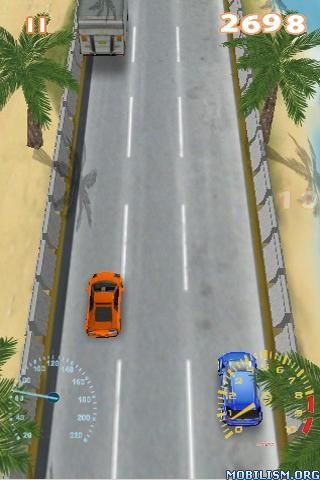
SpeedCar v1.1.0 for android (game)


SpeedCar is a hot 3D racing game for Android phones. Download it and Enjoy the bullet physic engine and realistic car physic effect Now!
Feature Highlights
Equitable gameplay design
Tilt phone to control car direction
Tap screen to accelerate
One finger control model that you can play it very easy but fast-paced.
Important Note:
SpeedCar is just an Android game for you to play. In real world you should not drive so fast!

Talking tom cat v1.2.3 (android game)

Tom is your pet cat that responds to your touch and repeats everything you say with a funny voice. You can pit him, poke and punch him or grab his tail. Record videos of Tom repeating your words and share them with friends and family.

Games features: Talk to Tom and he will repeat everything you say with a funny voice. Pet his body or head to make him purr. Poke his head, belly or feet. Grab his tail. Pour a glass of milk for him to drink. Forget about him and he will yawn or sneeze.
 Support system version:  1.5--1.6--2.0--2.0.1--2.1--2.2--2.2.1--2.3--2.4--3.0--3.1--3.2--4.0
Support phone resolution:  240×320- 320×480 -480×800- 480×854

Selasa, 24 Juli 2012

Download and install Sprint Galaxy S3 SPH-L710 with Cyanogen Mod 10 Jellybean 4.1 Firmware

How to Update Sprint Galaxy S3 SPH-L710 with Cyanogen Mod 10 Jellybean 4.1 Firmware


Procedure to Update Samsung Galaxy S3 GT I9300 with Cyanogen Mod 10 Firmware:
  • Just in case if your device is not rooted, with the help of One Click tool to root & install Custom Recovery image in your Galaxy S3 by following the corresponding instructions.  Once it’s done, you need to install the ROM Manager application in your Galaxy S3 and again you will have to flash the Clock Work Mod recovery in your S3.
  • Turn Off the device so that your SGS3 can be entered in the recovery mode. Galaxy S3 can be entered in the recovery mode by pressing the Volume Up Key, Center button, and holding both simultaneously press the Power Button.
  • Select “install zip from sd card” > “choose zip from sd card” with the help of Volume rocker keys and press the power button to select the “Cyanogen Mod 10 preview for Galaxy S3 Package” and “Google Apps Package” then the Google Apps Package which you have placed in your device. It will take around 4 – 5 minutes for applying this update.
  • Once both the zip files are applied in your device, the recovery screen will be shown in which select “Go Back” to select the option of “reboot system now” for rebooting the device with the help of volume rocker keys and power button.
Note: Just in a rare case if the device is not updated and it gets into the boot loop mode, you need to again clear the cache from the recovery mode and retry the whole process from the start.
So there you go, to check on whether the update has been applied successfully or not, you need to head over to the path “Settings > About Phone” where you will see that the version will be shown as Jellybean 4.1 Cyanogen Mod 10 release. Do share with us in the comments section just in case if you face any issues and we will try out level best to sort out the same.

Download Sensation 3.5 rom for galaxy s2 Custom ROM Firmware

sensation3

How to Update Galaxy S2 with Sensation 3.5 ICS 4.0 Custom ROM Firmware


Procedure to Update Galaxy S2 GT I9100 with Sensation Custom ROM Firmware:
  • Download the Sensation Custom ROM Firmware Package from here to your computer. Once downloaded, connect your device to the computer and then place the zip file in your device. Don’t place the file deep into the device or else you will have to remember the path where you have placed the zip file in the recovery screen.
  • Disconnect the Galaxy S2 and turn off the phone so that it can be entered in the recovery mode.
  • Recovery mode in Galaxy S2 GT I9100 can be entered by holding the Volume Up button + the Home key button (the middle button). While holding these both buttons, turn ON your device. In recovery mode, select “Wipe data/factory reset” & “Wipe Cache partition”. Additionally, select “advanced” and clear the Dalvik cache too if you are on the custom ROM firmware.
  • Select “install zip from sd card” > “choose zip from internal sd card” and then choose the Sensation custom ROM firmware package which you placed in your device. Once you have selected the file, it will take around 4 -5 minutes for applying the same.
  • As soon as the update is applied, the device will be landing up in the recovery mode screen. In recovery mode screen, select “Go Back” and select the “reboot system now” for rebooting the device normally.
Note: If the device gets into the boot loop sequence or say gets stuck in the welcome screen, just re insert the battery and re follow the above instructions so as to again follow the above mentioned instructions.
So congratulations you have successfully applied the update of Sensation custom ROM firmware in your device. You can check the same from the path “Settings > About Phone” to check whether it has been updated or not. Do share with us in the comments section just in case if you face any issues and we will try out level best to sort out the same.